I have a couple digital voice recorders which allow me to record lectures, interviews, and conference presentations which I can later share electronically.
Two of the recorders create files in the Microsoft WMA format, but my favorite (and FREE open-source) editing program,
Audacity, does not import WMA files.
I use Apple's
iTunes to convert the WMA files to WAV files (which can be edited in Audacity).
Here is the process.
Go into iTunes.
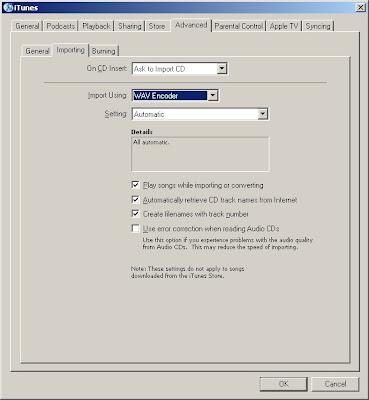
Use the menus EDIT > PREFERENCES >
[ADVANCED]..[IMPORTING] >
IMPORT USING: WAVE ENCODER // SETTING: AUTOMATIC
The use the menus FILE > ADD FILE TO LIBRARY, and select your WMA file(s).
As they are added to iTunes, the WMA files will be converted into .WAV files
The imported files are normally stored in your
MY DOCUMENTS > MY MUSIC > iTUNES > iTUNES MUSIC > UNKNOWN ARTIST folder
(or another subfolder if there is identifying track information from your recording device).


 Posts
Posts


