Thursday, April 19, 2007

Another Great, Free Photo Editor


Some of us budget money each 2 years to buy an upgrade to PhotoShop (yep, that would be me).

However, there are some shareware, open source, and freeware applications out there that will satisfy the needs of most instructors.

Bring us Paint.Net, which is a very easy to use image editor with many of the same menus and tools as found in PhotoShop. The software is "freeware" as initially developed by an undergraduate student for a course project.

What I really like is the support for layers and layer blending (transparency levels), since this makes the work of retouching photos and graphics much easier.

Wednesday, March 28, 2007

Desire2Learn Fusion Conference

D2L
Fusion
2007

The Desire2Learn 2007 Fusion conference is being held July 8-12, 2007 in Duluth, Minnesota, and it is being co-hosted by Lake Superior College and the University of Wisconsin-Superior.
Early Bird Registration is $425 - must be registered before May 4th, 2007


For more information, check out the D2L Fusion Conference Home Page

Sunday, March 25, 2007

Excel shortcuts

If you do a lot of work in Microsoft Excel, you might be able to work faster by keeping your fingers on the keyboard (rather than clicking through the menus with your mouse).

Excel has some shortcuts.

TAB key
TAB = move to next cell to the right
SHIFT+TAB = move to the next cell to the left

ENTER key
ALT + ENTER = create a line-break in the same cell (start a new line)
CTRL + ENTER = fill the highlighted range with the current entry
SHIFT + ENTER = move to the cell above

CTRL key combinations
CTRL + R = Fill to the right
CTRL + D = Fill down
CTRL + F3 = Define a name
CTRL + K = Insert a hyperlink
CTRL + Z = Undo the last action
CTRL + ; = Enter the current date
CTRL, SHIFT + : = Enter the current time

Single keys
ESC = cancel the current cell entry
HOME = move to the beginning of the line
END = move to the end of the line
F4 = repeat the last action

Thursday, March 22, 2007

Video Shooting Tips

I've created a video that illustrates easy methods to improve the quality of your video production.


The suggestions include:

  • Using of a tripod for your video camera,
  • Having simple backgrounds,
  • "Filling the frame" with your subject,
  • Lighting your subject from the side, and
  • Ensuring against continuity errors in outfits, hairstyles, lighting, etc.
Video Shooting Tips - Improving One Step at a Time

Monday, February 12, 2007

Sources of Video and Audio

Video Sources


Annenberg Foundation Media - http://www.learner.org/
PBS podcasts - http://www.pbs.org/podcasts/
NASA Video - http://www.nasa.gov/multimedia/
videogallery/index.html

U.S. Govt. Podcasts - http://www.usa.gov/Topics/Reference_Shelf
/Libraries/Podcasts.shtml

SBA Podcasts - http://www.sba.gov/tools/
resourcelibrary/Podcasts/index.html


Audio Sources


Podcast Networks - http://www.podcast.net/
National Inst. of Health - http://www.nih.gov/news/radio/

Climbing the Ladder - How to interview for a job.Podcast from BusinessWeek at:http://www.businessweek.com/mediacenter/
podcasts/climbing/current.html

Direct download link: http://www.businessweek.com/mediacenter/qt/podcasts/

If you are interested in listening to Podcasts related to business issues, you can visit
National Public Radio at:http://www.npr.org/templates/topics/
topic.php?topicId=1006

Minnesota Public Radio at:http://minnesota.publicradio.org/collections/economy/
Wisconsin Public Radio at:http://www.wpr.org/webcasting/archives.cfm (Joy Cardin, Kathleen Dunn, and Ben Merens)
BusinessWeek Online at:http://www.businessweek.com/search/podcasting.htm
Podcast Alley - Business at:http://www.podcastalley.com/podcast_genres.php?pod_genre_id=10
PodOMatic - Business at:http://www.podomatic.com/search/directory/Business

Tuesday, January 30, 2007

Serving Up Video on YouTube


YouTube.Com is a free site that you can use to host video content for your course.

The video content is streamed out to the user in an Adobe Flash file (meaning that users cannot easily download and store your materials). There is no limitation on the number of videos that you upload, and you have the ability to delete videos any time you desire.
The limitations on file size are that videos must be less than 100MB and shorter than 10 minutes. These restrictions are not that troubling, because you can always take a longer sequence and cut it into smaller pieces.

As you post new videos, they automatically are loaded in LIFO order (last in, first out) - so that your more recent additions are at the front of the list that viewers can access.

The one frustration is that the audio and video can fall out of synchronization (synch). This is a result of the conversion to Flash; it is a known issue and not one that you can easily control. Some people find this extremely distracting (especially those who might be hard of hearing and rely upon mouth position to help discern words), but most users will not find it too bothersome.

As a demonstration, I've uploaded a couple videos (my profile site is http://www.youtube.com/profile?user=nospam4artsnet ).

You can watch one of my videos (on how to get ready for recording audio using a computer headset microphone) by going to the link at:
http://www.youtube.com/watch?v=61wBoxz7lsg

Sunday, January 21, 2007

Mental Engineering and AdCritic

Mental Engineering


Mental Engineering episode
Studio shot - image link from MentalEngineering.com


Over the weekend, I had the honor and privilege of attending the taping of 2 episodes of the show Mental Engineering - which broadcasts on public television in about 100 markets. This show is GREAT! I was already a big fan before I had a chance to see the live recording.

John Forde (pronounced four-dee) is the host, and he brings together professors, comedians, and celebrities to discuss the psychological, social, and political aspects/impacts of nationally released television commercials.

The show runs on Channel 17 Saturdays at 9PM, and also intermittently on Channel 2 on Sundays at 11:30PM.

More information about the show is at: http://www.mentalengineering.com/index.html

Tapping some of the show's content might be a very useful activity for students in media studies, psychology, sociology, graphic design, advertising design, marketing, and entrepreneurship courses.

John also provide a "lesson plan" for graduate level students in social psychology. Information is at: http://www.mentalengineering.com/class.asp.

If you have interests in advertising or marketing, then you should definitely get involved in watching this show and telling your local public television affiliate to keep the show in its line-up. John is also looking for financial support - so if you come to love the show, consider a tax-deductible donation.

To see some low-resolution video clips from the show, you can visit YouTube.com and search for the user profile of JohnForde (http://www.youtube.com/profile?user=johnforde)


AdCritic.Com

Another great site, if you are interested in advertising, is AdCritic.Com and their companion magazine Creativity. This is a paid-subscription site, and it is pricey (they have a 12-month special for $99),
but when it was a free service, I found it to be one of the BEST resources regarding advertising from across the world (print ads as well as full-clips from television ads).


Saturday, January 13, 2007

Interview with Steve Creason, MIS

This is the second interview in the podcast series.

Assistant professor Steve Creason shared his views about Management Information Systems and the changing roles of work. Our conversation was so interesting that it went much longer than expected. Therefore, you get TWO podcasts in one (each about 20 minutes).


MCpodcast_02Creason1 (streaming MP3)

  • 1:45 How much technology and how much management?
  • 2:52 You have to understand Profit and Loss!
  • 4:36 You need a lot more business education than you need technology education.
  • 5:28 Outsourcing
  • 8:10 You want to concentrate on your core business.
  • 9:15 What's important data, and what's less important data?
  • 10:35 Government makes decisions based on consensus....
  • 11:30 On the verge on a shift in the way our economy works.
  • 13:00 We need to teach managers to manage by task rather than by hour.
  • 15:30 Remote work in a team environment.
  • 17:00 Getting managers and professors to teach to the capability of the technology.

MCpodcast_02Creason2 (streaming MP3)

  • 0:45 No longer tethered to the desk.
  • 2:35 Being "on call" through technology.
  • 3:40 Managing by time causes the problem.
  • 5:30 Working class has easier.
  • 6:30 Preserving the knowledge capital with an aging population.
  • 7:30 McDonalds' expert systems
  • 9:08 Knowledge narratives
  • 10:00 Company historians.
  • 12:00 Managing a company versus managing customer expectations.
  • 17:14 No one knew what Enron did.
  • 18:30 How much does it cost to keep your customers?
  • 21:10 The biggest failure in online.
  • 22:00 What does eBay really sell?
  • 23:00 The MIS program.

Friday, January 12, 2007

Friendlier Discussion Spaces


Online discussions are often just too text-based. As one means of encouraging some creativity, I have posted a few images inside the descriptions of my discussion threads.
At the least, I hope that this will make topics easier to locate for my grading purposes (and for students wanting to post comments) - especially when I re-shuffle the order of the discussion topics throughout the term.


Moreso, I hope to encourage students to make use of images, sounds, and possibly even video links in their major projects and shared research resources.

Here is a screenshot of the entrance to my discussion area.


In D2L, you can add images into your discussion topics by using the HTML Editing Tool for composing the forum descriptions and then using the image tool to UPLOAD A NEW IMAGE (that will appear in the page).


WARNING!!! If you are using D2L, make sure that the files saved into D2L have no space characters or other punctuation symbols in their file names. Use of the ampersand (&) gets especially rough. "Just say no!"


Similar use of images can also be placed into descriptions for the Dropboxes, Grade Items, and Quiz descriptions and questions.

Please make sure that any image you are using is well captioned and/or contains appropriate ALT text in the IMG tag.

Easy Course Images


Rather than buying a $900 digital SLR camera, you can create very high resolution images for your courses by using a $70 scanner hooked up to your computer.


Place the objects that you need photographed on the scanner glass (be realistic about size and weight of objects, please).


Then scan.
Simple visual elements help make content more interesting. Use of symbolism can also aid memory in a student's investigation of the topics.

Simple!


Cheap and Easy 3D for Online Courses


Do you have an object that you would like to show students in 3-dimensions?


Too hard to mail the object out for viewing?


Here is a simple yet effective optical illusion that will work for you.


Make two scans of the object.

The first scan, the object will be to the left-most position on the scanner.

The second scan, the object will be to the right-most position on the scanner.


Open both images and copy them into a new third image. The "side-views" of the object (which were originally toward the middle of the scanner) still need to appropriately point toward the center in the final composition.

Leave some blank "white space" between the objects.


Have students stare at the whitespace between the objects and slowly cross their eyes. All of a sudden, they see the 3-dimensional object in the "negative space" left behind.


Light colored empty "negative" space works best. View the sample above of what is normally a very flat MP3 player (has little dimension to begin with - but with this process, you see it "lift off" the screen).


Have fun!


Super Phone! The New Educational Toy!


It was time for an upgrade.
The old cell phone was two years old, which was just too old.
The new Motorola Q was the thinner winner. This new cell phone has a built in MP3 player, 1.3 megapixel camera, and Microsoft operating system with wireless Internet access and Bluetooth capability. You can also record video and watch video on the unit.
The built-in memory is pretty tiny, but there is a mini-SD slot that can accept 1GB memory cards for additional music and photo storage.
The camera resolution is not very high and the lens is very wide angle, but it is perfect for some quick web-sized images that are perfectly acceptable for web use.
The data package is quite pricey ($45 extra each month on top of normal cell plan package), but can be purchased on a month-by-month deal. Also - the battery life is tiny (I've purchased a AC charger for home, another for the office, and also a high current car charger).
So, why all the fuss?
This is a great tool for teaching and learning!
See something interesting while walking down the street?
Take a quick photo.
Want to do something intellectual while exercising?
Download and listen to a web podcast from your favorite news or education site.
One the run?
Check email and even surf over to your course site to see the newest postings.
The ability to carry all of this functionality in your shirt pocket is fantastic.
I'm looking forward to being able to add more image content to my courses quickly and easily, such as the photo of Ken Hess (below) taken with the new Q-cell.

Thursday, January 04, 2007

Free, online webcasts from UC Berkeley

http://webcast.berkeley.edu/

If you're wondering how podcasts can be incorporated into your course site, check out the University of California-Berkeley webcast link above. The site offers podcasts both for classes and for events that have occured on the campus. You can download individual podcasts or subscribe using an RSS feed (to iTunes or other RSS scrape).

For the events, there are also video casts (vodcasts). This site shows an appropriate use of media. The production values are modest and the media content is compressed to reasonable sizes.

The one shortcoming is the lack of text-transcripts of materials. There are still needs for academia to have access to much better speech to text translation software. IBM has completed research and is developing better speech recognition tools, including ViaScribe. Information about this development is available at: http://researchweb.watson.ibm.com/journal/sj/443/bain.html

Friday, December 01, 2006

Podcast with Ken Hess, curriculum coordinator


Ken Hess, Curriculum Coordinator for Management Courses


This is the first interview in the podcast series. Ken was kind enough to share his advice about the types of resources students should be taking advantage of during their studies at Metropolitan State University.


MCpodcast_01Hess (streaming MP3)


  • 1:14 Introduction and Ken's Background

  • 1:57 Interesting jobs graduates have found

  • 3:00 What sets COM graduates apart from the competition

  • 5:25 Resources available to students through Metropolitan State University

  • 8:25 Where should students look to be more aware of their industries

  • 10:25 How much time should students commit to their classes

  • 13:00 Career advice Ken has received

  • 16:37 End


Friday, November 17, 2006

Role Playing in Online Courses

James in Diary of Anne Frank, approximately 1983
Back in high school, I enjoyed being active in theatre and choir. (I'm on the left of the image; show is Diary of Anne Frank.)

A powerful method of evaluating that students can apply what they have learned is through role play.

In an online course, role-play can take place in many forms.

The most direct and simple form is to have the student interact with you, the instructor, directly.

As an example, in my business management class, I might write off an email pretending to be an angry subordinate who is challenging the authority of the manager (the student), or I might pretend to be an important client who is facing "option anxiety." Having the student play a role in the interaction would help me to better classify their understanding of and application of the materials from the course.

Another instructor I have recently talked with is interested in putting students into an online "negotiation" with 3 to 5 players per round. Each player will have a list of negotiation points that he/she is trying to win, and the higher the number of points won, the higher the score for the assignment (everyone fails if there is no agreement at the end of the round - to avoid stall tactics). Using online discussion boards is a way to track the points agreed upon (won) and those left unsettled.

With the use of SKYPE (www.skype.com ) - role playing via the Internet becomes much easier. Skype allows online conference calls of up to 5 users, and this allows for multiple role-players in a single activity online.

I even saw a "game" in which the online course home page looked like a manager's desk in a corporate office. The "phone" connected the user to "voicemails" (text-based) requiring urgent actions, the computer connected the user to "emails" and documents, and the calendar had a "to do" list that needed to be accomplished in that sitting. The instructor played multiple roles to provoke the student's action - as well as provide feedback on progress. I would believe that this would be time consuming, but also (likely) a very powerful learning activity.

More Pedagogy and Method Blogs

I am stumbling onto a few more blogs that deal with similar issues (pedagogy, technology, and instructional design). Here are some links.

http://eduwithtechn.blogspot.com/
http://www.knownet.com/writing/weblogs/Graham_Attwell/
http://pedagogyjournal.blogspot.com/
http://tojou.blogspot.com/
http://uhvonline.blogspot.com/
http://people.uis.edu/rschr1/onlinelearning/blogger.html
http://www.elearning-reviews.org/
http://learningonlineinfo.org/

I encourage you to explore other views, ideas, and methods, and I will do the same (then report back here).

Get Your Students Listening!

One issue that faculty commonly face is connecting the materials from the textbook to examples that students can "touch and feel." Often it is important to students that faculty make the content relevant in an up-to-date and "locally connected" manner. Management and marketing are two curriculum areas that can benefit from connections to local business information and content available via the web.

In every major metropolitan area, savvy businesses are setting up podcasts (web-based radio shows) that inform and educate prospective clients about the news, theories and applications, technologies, and opportunities in their industries.

The benefit to podcasts is their portability. Many students have MP3 players or iPods to which they can download podcast content and then listen to the materials during exercise routines, in traffic congestion, and during breaks at work. The audio format can be especially helpful to students whose learning style preferences are spoken language.

Not every student will have access to portable audio players, and students with hearing impairments might not be able to benefit from the content (unless it has been fully transcribed, which is seldom done), so the use of podcasts should be as supplemental material to the course (not required in activities or assessments).

Faculty teaching business topics might want to investigate:
http://www.ibizradio.com/


When possible, it is best to feature locally produced podcasts. Finding local businesses and organizations that offer these online audio segments is a bit of a hunt.

For Minnesota, one site that offers links to local content is:
http://podcastmn.com/
Many of these are music, humour, and adult podcasts, but there are also some with academic appeal.


In the Minneapolis metropolitan area, here are some podcasts examples.
(Note: I have not financial or other ties to any of these sites, and these are offered as examples without endorsement.)


GENERAL ECONOMY and POLITICS
http://www.minneapolis.org/podcast/ - Minneapolis.Org: Features about the quality of life, activities, and events in the Minneapolis area
http://del.icio.us/TwinWest (and http://www.twinwest.com/ main site) Chamber of Commerce

INTERNATIONAL BUSINESS
http://technomicasia.blogspot.com/ - Technomic Asia: the China Business podcast

MARKETING
http://providentpartners.blogspot.com/ - Marketing Edge: Marketing and Public Relations
http://www.prweek.com/us/podcasts/ - Public Relations Week

SMALL BUSINESS
http://www.sba.gov/tools/resourcelibrary/Podcasts/index.html - Small Business Administration

Wednesday, November 15, 2006

Easy Photo Editing for Online Courses!

James
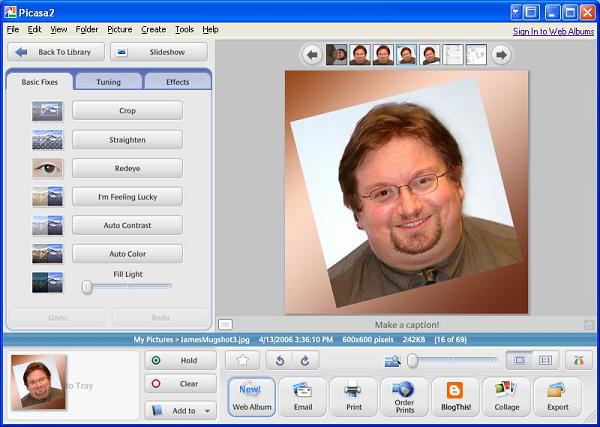
Yes! Another cool Google tool. Picasa is free download program from Google that allows you to quickly and easily crop, size, and perform basic editing on a photo (brightness, contrast, color-balance, red-eye fix).

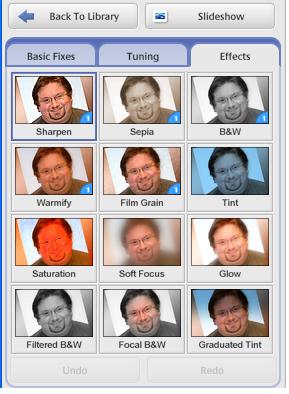
There are also built-in filters to allow some "quick and easy" artistic modifications to your files.

Download the file from www.google.com >> MORE >> EVEN MORE

Picasa screenshot main interface Picasa FILTER selections

Tuesday, November 14, 2006

Lost in Translation?

Screenshot of Faculty Training webpage translated into Spanish - click image to load larger version.

Do you feel that some of your content is getting "lost in translation?"
Get ready for another great Google tool!

Google Language Tools allow you to translate text or web pages into Arabic, Chinese, English, Spanish, German, French, Italian, Portuguese, Korean, and Japanese via a simple interface. Above is a sample translation from English into Spanish.

This is a wonderful application for beginning language students as well as those who might be studying music, business (human resources), or nursing.
This is also a helpful application for students who speak English as a second language; they can use this tool to translate your content into their native language - in order to more quickly understand concepts and ideas.

Best of all - the tool is free!
Enjoy!

GoogleEarth is Rock Solid!

Screen capture showing downtown Minneapolis in 3-Dimensional view from 300 feet above street level via GoogleEarth.
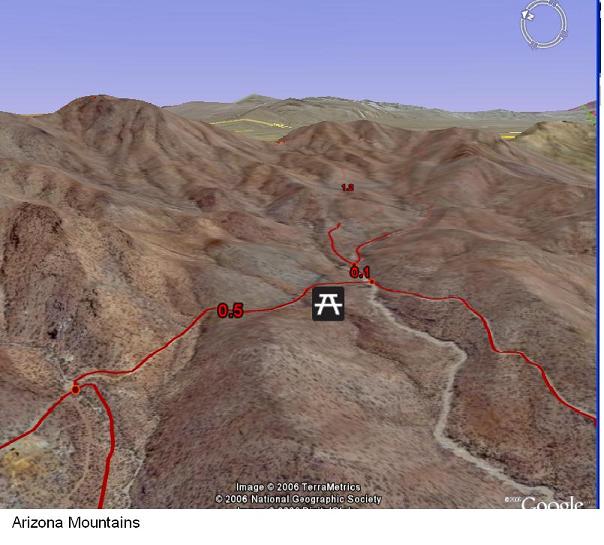
Screen capture showing mountain ranges in Arizona via GoogleEarth.

I've "noodled around" in GoogleEarth now for a couple of weeks. For someone who is geographically challenged (like myself), being able to see a 3-dimensional view of a city skyline is so much more helpful than a flat 2-d "top down" view.
The first image above shows the Management Education Center building in Minneapolis (highlighted in gold) in a rotated view on Google Earth.

Only buildings in downtown areas of major metropolitan areas are in 3D relief, but you can still "fly" over the 3-dimensional landscape as though you are in an airplane.
One of my favorite features is a "spin the globe" where you drag and release the mouse - and the landscape below keeps moving - again, like a virtual flight!

The second image shows mountains in Arizona. Although you can see the 3-D relief in the image - the actual 3-D rendering in the live application will have you sitting for hours on the computer just "traveling" the geography.
This free site can assist in teaching about urban planning, geography, biology, history, and countless other subjects. Allowing students to view the terrain paints events in a much more interesting light.

Check it out at http://earth.google.com and click on MORE>>

Friday, November 03, 2006

Software Suite - StarOffice

The current academic discount price for Microsoft Office 2003 Professional is around $180 (www.academicsuperstore.com ).

If you or your students are looking for a more affordably priced, Microsoft-compatible software suite, consider Sun's StarOffice (http://www.sun.com/software/star/staroffice/
competitive_view.jsp
).
Not only does this software emulate the look and feel of Microsoft Office, but it also reads, writes, and edits files in MS Office file formats.

Additionally, StarOffice can create PDF output files (normally an additional cost, for Adobe Acrobat PDF Writer at $150 for academic discount).

Being able to create PDF files is extremely beneficial for online course development. Most computer users already have the free Adobe Acrobat Reader program already installed on their computers (either through direct internet download from http://www.adobe.com/products/acrobat/readstep2.html or as part of the installation process for other software packages which have documentation in PDF files).
PDF files tend to be much more accessible to persons with disabilities, and the bundling of this functionality right within StarOffice allows you to share written documents, spreadsheets, and PowerPoint-like presentations with your students simply and easily.

$330 worth of software utility for a $70 price seems like a very "smart decision."

For the truly "geeky" computer users, this software can run on Windows, Linux, Solaris, and Mac OSX, and it also complies with teh OASIS standard file formats that have been widely adopted by the European Union.

Tuesday, October 31, 2006

Target Web Accessibility Case in National Law Review

The case against Target Corporation alledging the company's website is inaccessible to the blind has received press coverage in a National Law Review's September 28th article.

At this stage, the federal judge in the case, U.S. District Judge Marilyn Hall Patel, has ruled that the case cannot be dismissed on the basis that the site is not a physical location of public accomodation. In the judge's ruling, she stated, "to limit the ADA to discrimination in the provision of services occurring on the premises of a public accommodation would contradict the plain language of that statute."

The National Federation for the Blind (NFB) estimates that it would cast Target $20,000 - $40,000 to update the online site Target.Com to meet accessibility standards to work with screen-reader software. If instead those design components had been included in the original design, the NFB considers the cost to be "negligible."

Further information on this story can be found at the link:
http://www.law.com/jsp/ihc/PubArticleIHC.jsp?id=1159347929235

Monday, October 30, 2006

Template for Online Modules

The following is a template that can be used for online learning modules.

The start of the template is an adaptation to the audience and an introduction to the materials. In this section the instructor has the opportunity to inspire students, including providing a frame of reference for how the content fits into the course and into the broader context of the degree program. Faculty also have the opportunity to state why the topic is personally important, such as,

"while providing my consulting services, I find the most important part of the exchange is the clear documentation of the scope and expectations of both parties in the contract. Learning from having been 'burned', my contracts are now several pages long to help clarify expectations and provide a clear process to help ensure that the consultation can be successful. This module introduces basic contract law, so that when you are creating your own contracts with vendors or customers, you will better understand the sections that should be included in the contracts as well as the extent of liabilities you could face if performance is lacking."

Next, students should be provided with a clear and comprehensive checklist of the specific activities they are responsible to complete during this module. This helps students focus there attention and studies as well as alleviates the concern about "unwelcome surprises."

Next, students should be given specific learning objectives / goals and the measures that will be used to determine the accomplishment of those objectives / goals. Learning objectives should be very specific and measureable, and assessments need to be designed as a means of measuring progress toward the learning objectives.

Instructors must guide the learning. If the course textbooks are well produced, the instructor content is facilitation toward the best use of the materials. If the content in the textbook is poor, then faculty need to develop new content that clearly presents the topics to students in the online format.

After the content is delivered, students with further interests should be referred to other sources of information for follow-up. These might be websites, professional organizations/societies, journals & databases, authors and books in the field, and conferences / exhibits / conventions related to the topics in the module.


Title - Module Name

Introduction to Module (adaptation to the audience)

  • As the instructor, I feel this content is important because ....
  • The reasons you should be interested in this content are ....
  • This content will allow you to ....
  • Skills you will learn include ...
  • Of particular interest ...

Checklist To Complete the Module

  • Required Readings:
  • Supplementary Readings:
  • Required Research:
  • Quizzes:
  • Homework:
  • Discussions:
  • Other Participation Activities:


Learning Objectives and Assessments

By the completion of this module, the student should be able to do the following:

  • Properly identify the terms ..., concepts of ..., and theories of ... presented in the chapter. You will demonstrate meeting this objective by successfully completing the online quiz found under the QUIZZES tool.
  • Apply the key concepts of ... and processes of ... detailed in the chapter to new work problems. You will demonstrate meeting this objective by properly identifying the issues, the boundaries, and the alternatives within the case study and then defend your recommended course of action.
  • Demonstrate the proper process and choice of tools ... and formulas ... . You will demonstrate your competency in this objective by completed the assigned homework problems on ... and providing discussion responses on ... in a clear and organized format including citing processes and resources as appropriate.

Special instructions on completing these assignments will be listed in this document at ....

Additional Instructor-Provided Content

The content you are giving students would appear here.


Resources and Further Exploration

Campus Links

External Links

Saturday, October 28, 2006

What we lose in salary...

Hardware...
Software...
UNDERwear...


should be kept clean and should be replaced every three years with something new.


Corner of laptop computer keyboard

As educators, what we lose in salary, we make up in educational discounts on software! (grin)

If you need to toss some outdated software, you can receive an educational discount on many popular software packages.

Here are a few sources that offer academic-discounts. I have no financial ties to any of these companies - I simply "like them" as good sources of information and products.

http://www.campustech.com/ - CampusTech currently has the best site that I've found. They have prices slightly lower than other vendors, and they have finally updated their website design to offer much more detailed product descriptions and hardware requirements.

http://www.academicsuperstore.com/ - Academic Superstore used to be my favorite site, and it is now #2 only because prices seem to be a few dollars higher than my #1 pick. This site has a long history of making fabulous efforts to provide full product descriptions and hardware requirements. The site also sells some specific hardware items too (such as digitizing tablets - for photographers and graphic artists to use a pen/stylus rather than mouse). I've personally shopped this site many times, and I have always been pleased with the transactions and speed of delivery.

http://www.studentdiscounts.com/ - This site has a very useful home page, providing current pricing for the most popular software packages used by faculty and students.

If you consult or use software in your business (in addition to teaching), make sure to carefully read the license agreements, as many times commercial use is prohibited under academically priced products (Adobe is GREAT! Currently, they allow commercial use along with academic use on their products.) Visit the software publisher sites directly for more information on any limitations of the academic licenses if this applies to you.

News and Views Podcasts

One of the best methods for incorporating media into an online course is to add audio content; audio is compact - so that users even with dial-up internet service can gain access to the media materials.

If you are interested in creating your own audio content, it is inexpensive and fairly easy to do (view some of my materials on MERLOT at
http://www.merlot.org/merlot/viewMember.htm?id=18564 ).

Although you can create your own audio content, you might also consider linking to the "News and Views" content available through National Public Radio
(http://www.npr.org/rss/podcast/podcast_directory.php ) or your local public radio affiliates, such as Minnesota Public Radio (http://minnesota.publicradio.org/radio/podcasts/ ). in addition to "subscriptions" (to your iTunes or other podcast listening software), many sites provide links to specific broadcasts that you can share with your students. The secret is to check your favorite sites frequently in order to find the direct link while it is still posted (and then sharing this immediately with your students).
Future Tense with Jon Gordon is one of my favorite programs, so I listen religiously. As an example, (http://www.publicradio.org/columns/futuretense/
2006/10/23.shtml#008208
) is an interview with Microsoft's Kristin Johnson that talks about the security of the new Vista Windows operating system (first broadcast 10/23/2006).

If you are interested in more information about what a podcast is, you can read more at WikiPedia (http://en.wikipedia.org/wiki/Podcast ).

Friday, October 27, 2006

Conference Call for Proposals - Due 11/15/06

The MnSCU Center for Teaching and Learning is currently having a Call For Proposals to its Realizing Student Potential / ITeach conference (to be held March 1-3, 2007).
The deadline for proposal submissions is November 15th, 2006, and the focus for this year is addressing issues that concern adjunct and part-time instructors.

More information is at the site:
http://www.ctl.mnscu.edu/events/rspconf/2007/proposal.html

Referral to another blog: Desire2Blog

Barry Dahl - image linked from Lake Superior College websiteI would like to just pass out a quick referral to the blogging site of Barry Dahl, current co-chair of the MnOnline Council.

His "Desire2Blog" site addresses issues in eLearning, the Desire2Learn instructional management system, and other issues in higher education.
Barry incorporates audio podcasts in his blog using a service called ODEO.
His blog has excellent content that users of D2L should find interesting.

The site can be accessed at:
http://desire2blog.blogspot.com/

James

Catching the JumpDrive Flu

USB Flash Memory drives are extremely popular, essentially making 3-1/2 inch floppy disks obsolete.

Some newer devices combine MP3 players, FM radios, and voice recorders into a "one tool rules" device.

However, with the increased use of jump drives, there are even more risks that computer worms and viruses might "jump" to you.

USB Flash Memory Drive

Jump drives have much larger capacities and run much more quickly than floppy diskettes. This makes them ideal for carrying and transferring viruses among computers. Also, these characteristics (and their appearance as a new "drive" to your computer) is a likely target for viruses, which may attempt to make replicas onto your USB device.

Another worry is spyware that can capture your usernames, passwords, and other confidential information. Spyware is very easy to copy onto your computer by a "friend" interested in learning more about you or having access to your computer when you're not around.

It is also very easy for someone with a jump-drive to copy sensitive and private information from your computer quickly and easily. Be cautious about allowing others to plug their flash-drives into your computer while you are logged in under your network account. Make sure that all anti-virus software is up-to-date, and "take the driver's seat" when any files are being copied to and from your computer.

If you find a flash drive, don't give into the temptation of keeping it or trying to "peek" into its contents. The "forgotten" jump drive might be a trick to install some nasty software onto your computer.

Some corporations are now "locking down" their computers so that USB devices cannot be added to the system. It is pretty easy to "play it safe" with your computer and your data.

Here are a few quick guidelines.

  • Update daily your anti-virus software definition file, and make sure that you pay your subscription renewal BEFORE it goes out of date.
  • Every week, schedule your computer to run a full system virus scan (which might catch additional files not found in "on-the-fly" virus checking).
  • When your computer does its weekly scan, also scan your USB jump drives.
  • Only allow USB drives from trusted sources to be connected to your computer (i.e. people who also are running up-to-date anti-virus software). Discourage others from using your computer in your absence.
  • If you do get a virus warning, remove the flash drive immediately (it may still be trying to download other viruses to your system), and then run a full system virus scan.
  • For flash drives that only contain data, routinely format them to erase any old file remnants.

Writing done Right!

Cool Site


Purdue's Online Writing Lab serves as an excellent model of what an online writing lab could be.
Check it out at:
http://owl.english.purdue.edu

Included in the site are the topics:


  • Teaching Writing
  • The Writing Process
  • Research and Citation
  • Quoting, Paraphrasing, and Summarizing
  • Profession, Technical, and Scientific Writing
  • Job Search Writing
  • Literary Analysis and Criticism
  • Writing in the Social Sciences
  • Creative Writing
  • General Academic Writing
  • Grammar and Mechanics
  • English as a Second Language


Excited Student
There are restrictions on the use of their materials, so please read the site's "Fair Use Policy."

Very cool site! Check it out!

Thursday, October 26, 2006

Reinflate the Wheel

You've heard it hundreds of times... "Don't reinvent the wheel."
Agreed! Reinflate it!

A great strategy for incorporating media into your course sites is to locate and link to existing media and learning objects already available.

I would suggest starting at Merlot.

http://www.merlot.org/ - Multimedia Educational Resource for Learning and Online Teaching (MERLOT) is a "search engine" for finding learning objects (which can be used at little or no cost). The site offers peer reviews and opportunities to network with colleagues.

Other very useful sites to "reinflate" are:
http://ocw.mit.edu/index.html - MIT Open Courseware
http://www.pbs.org/teachersource/ - PBS Teacher Source
http://www.learner.org/ - Annenberg Foundation (K-12 programming through Satellite and Video On Demand)


More sites for learning objects to check out:
http://www.lolaexchange.org/
http://ali.apple.com/ali/resources.shtml
http://careo.ucalgary.ca/cgi-bin/WebObjects/CAREO.woa/
http://cnx.org/
http://ideas.wisconsin.edu/videoideas.cfm - includes library of videos


Index of Learning Object Collections
http://www.uwm.edu/Dept/CIE/AOP/LO_collections.html

Reviewing what others are using and creating not only provides you with a ready source of content, but it also helps you design better materials from scratch.

There are some really great resources, some "okay" resources, and some that are not very well produced. Investigate and thoroughly "test" before offering anyone else's work to your students.

James